本演習では,1年生次に学習した基礎プログラミング演習I, II の知識を前提に,Java言語によるプログラミング
の演習を行う.演習の主題は,プログラミング言語そのものではなく,プログラミング言語を使ったアプリケーショ
ンの構築にある.そのため,プログラミングに関する基礎的な知識は,各自での復習/予習が必須である.
この講義では,基礎プログラミング演習I, IIと同様に,エディタを利用してプログラムを作成します.
Visual Studio Code for macOS を推奨します.
上記の演習環境のインストール方法で,仮想環境を選択した場合,利用するエディタは
Visual Studio Code for macOS に限定されますので,ご注意ください.
他のエディタを使いたい場合は,Java環境をローカル環境にインストールしてください.
まずは,以下のクラスファイルの基本形を覚えておきましょう.
GivenClassName は与えられたクラス名に置き換えてください.
run メソッド内に指定されたプログラムを書いてください.
main メソッドは返り値の型の前にpublic staticというキーワードがついていますが,これらのキーワードは今のところは mainのみにつけるものと思ってください.
  1:
  2: string
  3: Exception in thread "main" java.lang.NullPointerException
  4: 	at NullPointerExceptionDemo.run(NullPointerExceptionDemo.java:9)
  5: 	at NullPointerExceptionDemo.main(NullPointerExceptionDemo.java:14)
publicclassFactorial2{voidrun(String[]args){Integernumber=Integer.valueOf(args[0]);Integerfactorial=this.factorial(/* 引数に何を渡すか考えてください */);// number の階乗を計算する.System.out.printf("%d! = %d%n",number,factorial);}// ここに factorialメソッドを定義してください.}
publicclassFactorial2{voidrun(String[]args){Integernumber=Integer.valueOf(args[0]);Integerfactorial=this.factorial(number);// number の階乗を計算する.System.out.printf("%d! = %d%n",number,factorial);}Integerfactorial(Integermax){Integerfactorial=1;for(Integeri=1;i<=max;i++){factorial=factorial*i;}returnfactorial;}publicstaticvoidmain(String[]args){Factorial2factorial=newFactorial2();factorial.run(args);}}
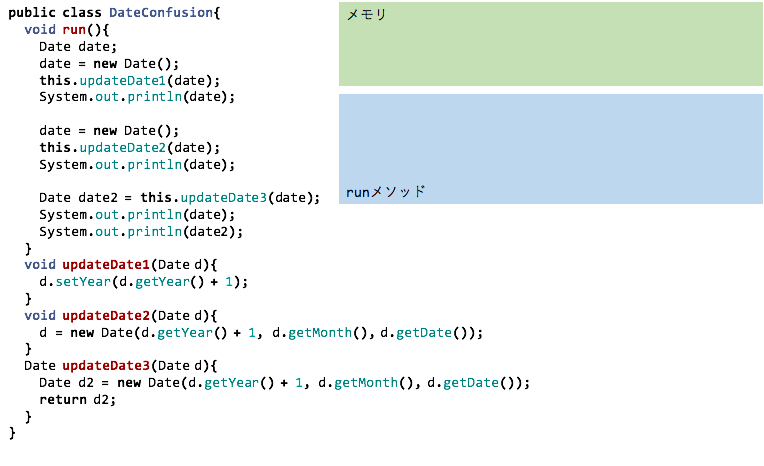
publicclassDateConfusion{voidrun(){Datedate;date=newDate();this.updateDate1(date);System.out.println(date);date=newDate();this.updateDate2(date);System.out.println(date);date=newDate();Datedate2=this.updateDate3(date);System.out.println(date);System.out.println(date2);}voidupdateDate1(Dated){d.setYear(d.getYear()+1);}voidupdateDate2(Dated){d=newDate(d.getYear()+1,d.getMonth(),d.getDate());}DateupdateDate3(Dated){// dの時刻と同じ時刻の Date 型の実体が作成される.Dated2=newDate(d.getYear()+1,d.getMonth(),d.getDate());returnd2;}// mainメソッドは省略.}
$ java ArgsSorter one two three four five six
before: one, two, three, four, five, six,
after: five, four, one, six, three, two,
$ java ArgsSorter time flies like an arrow
before: time, flies, like, an, arrow,
after: an, arrow, flies, like, time,
$ java ArgsSorter 2016106before: 2016, 10, 6,
after: 10, 2016, 6,
publicclassSquareRoot{voidrun(String[]args){ArrayList<Double>targets=findTargets(args);for(Doublevalue:targets){Doubleresult=calculate(value);System.out.printf("sqrt(%f) = %f (%f)%n",value,result,Math.sqrt(value));}}ArrayList<Double>findTargets(String[]args){ArrayList<Double>targets=newArrayList<>();for(Integeri=0;i<args.length;i++){targets.add(Double.valueOf(args[i]));}returntargets;}Doublecalculate(Doublen){Doublethreshold=0.00001;Doublex=10.0;// 初期値 x0Doubley=function(n,x);// ここにニュートン法のプログラムを書きましょう.while(Math.abs(y)>threshold){Doubleslant=2*x;// y = a x + b が接線の式.傾きaは2xとなる.// bを求める.Doubleb=y-slant*x;// y = 0 の時のx座標を求める.x=-1*b/slant;y=function(n,x);}returnx;}// x^2 - n を計算するメソッド.Doublefunction(Doublen,Doublex){returnx*x-n;}publicstaticvoidmain(String[]args){SquareRootsqrt=newSquareRoot();sqrt.run(args);}}
publicclassComplex{// ...Complexadd(Complexvalue){// this + value の結果を返す.}Complexsubtract(Complexvalue){// this - value の結果を返す.}Complexmultiply(Complexvalue){// this * value の結果を返す.}Complexdivide(Complexvalue){// this / value の結果を返す.}}
それぞれのメソッドの中では,this も value も値を変更せず,新たな実体を作成し,その実体に適切な値を設定して返して(return)ください.
例題 conjugate が参考になるでしょう.
出力例
$ java ComplexCalculator
absoluate( 5.00 + -6.00 i)= 7.810250
conjugate( 5.00 + -6.00 i)= 5.00 + 6.00 i
5.00 + -6.00 i + 3.00 + 2.00 i= 8.00 + -4.00 i
5.00 + -6.00 i - 3.00 + 2.00 i= 2.00 + -8.00 i
5.00 + -6.00 i * 3.00 + 2.00 i= 27.00 + -8.00 i
5.00 + -6.00 i / 3.00 + 2.00 i= 0.23 + -2.15 i
$ java ListFiles a/b/c/d/e
f
$ java Remover a/b/c/d/e/f
$ java ListFiles a/b/c/d/e
$ java Remover a
$ java ListFiles a
ls: a: No such file or directory.
voidreadMethod(Filefile)throwsIOException{BufferedReaderin=newBufferedReader(newFileReader(file));// (1)// 上記の(1)の処理を区別して書くと,次のような処理になる.// FileReader freader = new FileReader(file);// BufferedReader in = new BufferedReader(freader);Stringline;while((line=in.readLine())!=null){// 1行ずつ処理を行う.}in.close();}
voidwriteWithWriter(Filefile,Stringmessage)throwsIOException{PrintWriterout=newPrintWriter(newFileWriter(file));// (2)// 上記の(2)の処理を区別して書くと次のような処理になる.// FileWriter fwriter = new FileWriter(file);// PrintWriter out = new PrintWriter(fwriter);out.print(message);out.close();}
voidwriteWithWriter(Filefile,Stringmessage)throwsIOException{PrintWriterout=newPrintWriter(newFileWriter(file));// (2)// 上記の(2)の処理を区別して書くと次のような処理になる.// FileWriter fwriter = new FileWriter(file);// PrintWriter out = new PrintWriter(fwriter);out.print(message);out.close();}voidwriteWithOutputStream(Filefile,Stringmessage)throwsIOException{BufferedOutputStreamout=newBufferedOutputStream(newFileOutputStream(file));// (3)// 上記の(3)の処理を区別して書くと次のような処理になる.// FileOutputStream fout = new FileOutputStream(file);// BufferedOutputStream out = new BufferedOutputStream(fout);out.write(message.getBytes());out.close();}
importjava.io.*;publicclassCatByStream{voidcat(Stringfile)throwsIOException{System.out.printf("========== %s ==========%n",file);FileInputStreamin=newFileInputStream(file);this.printFileContent(in);in.close();}voidprintFileContent(FileInputStreamin)throwsIOException{Integerdata;while((data=in.read())!=-1){System.out.write(data);}}// run や main メソッドは省略.}
StringstringA="this is a pen";StringstringB="is a";StringstringC="are";if(stringA.contains(stringB)){System.out.println("このメッセージは表示される.");}if(stringA.contains(stringC)){System.out.println("このメッセージは表示されない.");}
出力例
$ grep line Cat.java
String line;while((line= in.readLine()) != null){ System.out.println(line);$ java Grep line Cat.java
Cat.java: String line;Cat.java: while((line= in.readLine()) != null){Cat.java: System.out.println(line);$ java Grep class Cat.java Cat2.java
Cat.java: public class Cat{Cat2.java: public class Cat2{
$ cat string.txt
String class represents character strings.
All string literals in Java programs, such as "abc", are implemented as instances of this class.
Strings are constant; their values cannot be changed after they are created.
String buffers support mutable strings.
Because String objects are immutable they can be shared.
$ sort string.txt
All string literals in Java programs, such as "abc", are implemented as instances of this class.
Because String objects are immutable they can be shared.
String buffers support mutable strings.
String class represents character strings.
Strings are constant; their values cannot be changed after they are created.
$ java Sorter string.txt
All string literals in Java programs, such as "abc", are implemented as instances of this class.
Because String objects are immutable they can be shared.
String buffers support mutable strings.
String class represents character strings.
Strings are constant; their values cannot be changed after they are created.
$ cat string2.txt
abra
cada
bra
abc
def
$ java Sorter string2.txt
abc
abra
bra
cada
def
$ cat string.txt
String class represents character strings.
All string literals in Java programs, such as "abc", are implemented as instances of this class.
Strings are constant; their values cannot be changed after they are created.
String buffers support mutable strings.
Because String objects are immutable they can be shared.
$ java Frequencies string.txt
All: 1"abc",: 1constant;: 1be: 2string: 1instances: 1.... 以下略
$ cat string.txt
String class represents character strings.
All string literals in Java programs, such as "abc", are implemented as instances of this class.
Strings are constant; their values cannot be changed after they are created.
String buffers support mutable strings.
Because String objects are immutable they can be shared.
$ tail -1 string.txt
Because String objects are immutable they can be shared.
$ java Tail 2 string.txt
String buffers support mutable strings.
Because String objects are immutable they can be shared.
$ java Tail 1000 string.txt
String class represents character strings.
All string literals in Java programs, such as "abc", are implemented as instances of this class.
Strings are constant; their values cannot be changed after they are created.
String buffers support mutable strings.
Because String objects are immutable they can be shared.
Exception in thread "main" java.lang.ArrayIndexOutOfBoundsException: Index 0 out of bounds for length 0 at FizzBuzz.run(FizzBuzz.java:5) at FizzBuzz.main(FizzBuzz.java:25)
1行目にどのようなエラーであるか,2行目以降にプログラムのどこで発生したかが書かれています.
どのようなエラーなのかは,thread "main" の後ろを見てみましょう.
ここには,エラーの原因となった例外のクラス名が書かれています.
上の例の場合,ArrayIndexOutOfBoundsException,すなわち,array index out of bounds exception です.
これは,配列の範囲を超えて要素にアクセスしようとした場合に発生する例外です.
英語の意味がわからない場合,Google 翻訳や DeepL 翻訳にかけてみましょう.
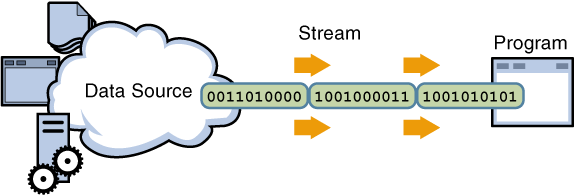
Java 8 から Stream API と呼ばれるデータ処理を行うためのAPIが導入されており,これにより for などのループを置き換えることが可能になります.
この Stream API とメソッド定義を簡略化して書けるラムダ式を用いることにより,より簡潔に分かりやすく書けるようになります.
そして,この Stream API は Java だけでなく,昨今のプログラム言語で数多くサポートされています.