第4講 数値計算(1/2)のサブセクション
ニュートン法による平方根の計算
アルゴリズム
平方根は Math.sqrtメソッドの呼び出しで求められると述べました.
ここでは,Math.sqrtを使わず,ニュートン法を用いて平方根を計算してみましょう.
ニュートン法のアルゴリズムは次の通りです.
- 適当な出発点 $x_0$から始まります.
- $f(x_0)$の時の$y$座標の値を計算し,$(x_0, y_0)$を求めます.
- $y_0$の絶対値が閾値(threshold; $0.00001$程度)より小さければ,$x_0$が平方根の値となります.
- $(x_0, y_0)$における$f(x)$の接線の式$l_0$を求めます.
- $l_0$と$x$軸との交点座標を求めます.この交点を$x_1$とし,手順の最初に戻ります(今までの$x_0$を$x_1$に置き換えて処理を進めてください).
絶対値
絶対値は,Math.absメソッドを利用して求められます.
Double value = -10.5;
Double positiveValue = Math.abs(value);
// => 10.5 が代入される.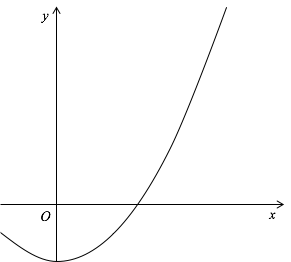
例題
実際にニュートン法のプログラムを書いてみましょう.
import java.util.ArrayList;
public class SquareRoot{
    void run(String[] args){
        ArrayList<Double> targets = findTargets(args);
        for(Double value: targets) {
            Double result = calculate(value);
            System.out.printf("sqrt(%f) = %f (%f)%n",
                    value, result, Math.sqrt(value));
        }
    }
    ArrayList<Double> findTargets(String[] args) {
        ArrayList<Double> targets = new ArrayList<>();
        for(Integer i = 0; i < args.length; i++){
            targets.add(Double.valueOf(args[i]));
        }
        return targets;
    }
    Double calculate(Double n){
        Double threshold = 0.00001;

        Double xValue = 10.0; // 初期値 x0
        Double yValue = function(n, xValue);
        // ここにニュートン法のプログラムを書きましょう.

        // |yValue| < threshold ならばループを抜ける.
        // (yValue の絶対値が閾値(threshold)よりも小さい)
        while(...){
            // xValue における放物線f(x)傾きを求める.
            // 傾き(slant)は 2 * xValue で求められる.
            // f'(x)=2x であるため.

            // 次は,接線が y 軸と交わる切片 b を求める(y = a x + b).
            // (xValue, yValue) を通り 傾き a は先ほど求めた.
            // そのため,b = yValue - (slant * xValue) で求める.

            // 次に,接線が x 軸と交わるときの xValue の値を求める.

            // yValue に 放物線の y の値(xValueを元に求める)を代入する.
        }
        return xValue;
    }
    // x^2 - n を計算するメソッド.
    Double function(Double n, Double x){
        return x * x - n;
    }
}
出力例
$ java SquareRoot 2 3 4 5 6
sqrt(2.000000) = 1.414214 (1.414214)
sqrt(3.000000) = 1.732051 (1.732051)
sqrt(4.000000) = 2.000000 (2.000000)
sqrt(5.000000) = 2.236070 (2.236068)
sqrt(6.000000) = 2.449490 (2.449490)任意桁の計算
BigInteger
Java言語の IntegerやLong型は表せる桁数が決まっています.Integerは
32ビット,Longでも64ビットであるため,それぞれ,
$-2^{31}〜2^{31} - 1$,$-2^{63}〜2^{63} - 1$
までの値までしか扱えません.
Javaでは任意桁の計算が行える型が存在します.
任意桁の整数を表すBigIntegerと任意桁の実数を表すBigDecimalです.
これらを扱ってみましょう.
BigInteger の初期化
任意桁の整数を表す型です.
BigIntegerを利用するときは,import java.math.BigInteger;というimport 文が必要です.
BigInteger型の実体を作成するときは,new BigInteger("表したい数")のように数値を文字列で指定してください.
この型を扱うとき,通常の四則演算記号が使えない点に注意してください.
BigInteger value1 = new BigInteger("10");
BigInteger value2 = new BigInteger("20");
BigInteger value3 = value1.add(value2); // => OK
BigInteger value4 = value1 + value2;    // => コンパイルエラー.
Integer型,BigInteger型の相互変換
プログラム中でInteger型の値をBigIntegerとして扱いたい場合や,逆にBigInteger型の値をInteger型として扱いたい場合があります.
以下のプログラムのような操作により,相互変換が可能です.
Integer intValue = 10;
// Integer型からBigInteger型へ変換する.
BigInteger bigValue = BigInteger.valueOf(intValue);
// BigInteger型からInteger型へ変換する.
// もし,bigValue が大きすぎて 32ビットに収まらない場合は,下位32ビットのみが返される.
Integer intValue2 = bigValue.intValue();BigInteger の四則演算
上記のように,足し算は addというメソッド呼び出しで実現します.
以下に対応を掲載します.どれも BigInteger型の変数b1とb2を使って計算しているものとします.
- 足し算(
b1 + b2)b1.add(b2)
- 引き算(
b1 - b2)b1.subtract(b2)
- 掛け算(
b1 * b2)b1.multiply(b2)
- 割り算(
b1 / b2)b1.divide(b2)
- 割った余り(
b1 % b2)b1.remainder(b2)
- 符号反転(
-b1)b1.negate()
- 比較
b1.compareTo(b2)b1の方が小さければ,負の整数.b1 < b2ならばb1.compareTo(b2) < 0
b1の方が大きければ,正整数.b1 > b2ならばb1.compareTo(b2) > 0
- 同じ値であれば,
0.b1 == b2ならばb1.compareTo(b2) == 0
なお,BigDecimalも基本的にはBigIntegerと同じです.
メソッド呼び出しで演算を行い,実体を作成するときは,実数を表す文字列を渡せば良いです.
サンプルプログラム
先ほど示した計算方法を実際にプログラムに書いてみましょう.
2つのBigInteger型の変数を作成し,四則演算,あまり,符号逆転の操作を行い,結果を表示します.
import java.math.BigInteger;
public class BigOperator{
    void run(){
        BigInteger b1 = new BigInteger("10");  // BigInteger型の実体を作成する.
        BigInteger b2 = BigInteger.valueOf(3); // Integer型からBigInteger型へ変換する.

        BigInteger result1 = b1.add(b2);       // b1 + b2
        BigInteger result2 = b1.subtract(b2);  // b1 - b2
        BigInteger result3 = b1.multiply(b2);  // b1 * b2
        BigInteger result4 = b1.divide(b2);    // b1 / b2
        BigInteger result5 = b1.remainder(b2); // b1 % b2
        BigInteger result6 = b1.negate();      // -b1

        System.out.printf("%s + %s = %s%n", b1, b2, result1);  // <= 13
        System.out.printf("%s - %s = %s%n", b1, b2, result2);  // <= 7
        System.out.printf("%s * %s = %s%n", b1, b2, result3);  // <= 30
        System.out.printf("%s / %s = %s%n", b1, b2, result4);  // <= 3
        System.out.printf("%s %% %s = %s%n", b1, b2, result5); // <= 1
        System.out.printf("-%s = %s%n", b1, result6);          // <= -10

        if(b1.compareTo(b2) > 0){ // b1 > b2
            System.out.println("b1 の方が b2 より大きい.");
        }
    }
}
例題 階乗改
第1講 練習問題 3. 階乗 を改良し,
桁あふれを起こさないようにしましょう.
前回作成した階乗のプログラムは,13!を正確に計算できません.
これを BigInteger を使って,どんな数値が与えられたとしても計算できるようにしてください.
クラス名をBigFactorialとしてください.
コマンドライン引数から値を受け取れるようにしましょう.
また,コマンドライン引数で受け取る値はInteger型として扱って良いです.
出力例
$ java Factorial 12 # => 前回のプログラム.正しい結果の限界.
12! = 479001600
$ java Factorial 13 # => 前回のプログラム.正しくない結果.
13! = 1932053504
$ java BigFactorial 11
11! = 39916800
$ java BigFactorial 12 13 14 15
12! = 479001600
13! = 6227020800
14! = 87178291200
15! = 1307674368000ユーザ定義の型2(複素数型)
複素数型の定義
ユーザ定義の型である複素数型Complexを作成しましょう.
フィールドには,Double型のreal,imagを定義してください.
また,printメソッドでComplexを出力するようにしましょう.
public class Complex{
    Double real;
    Double imag;
    void print(){
        System.out.printf("%5.2f + %5.2f i",
            this.real, this.imag);
    }
    void println(){
        this.print();
        System.out.println();
    }
    public String toString(){
        return String.format("%5.2f + %5.2f i", this.real, this.imag);
    }
}
上記のように,独自の型にはフィールドとメソッドを同時に定義できます.
なお,toStringメソッドはその実体を文字列に変換するときに自動的に呼び出されます.
標準的な Java の実体を拡張しているため,メソッドのシグネチャは必ず public String toString() である必要があります.
もし,publicをつけ忘れるとコンパイルエラーになります.toString内で
利用しているString.formatメソッドは C 言語の sprintf と同じ機能を持つものです.
書式付きフォーマッタで文字列を作成します.
Complex complex = // ... 何か値を作成する.
System.out.printf("%s%n", complex); // このようなとき,自動的に toString
System.out.println(complex);        // が呼び出され,complex の文字列表現が出力される.
複素数型を利用するプログラムの作成
次に,Complexを利用するプログラム ComplexCalculator を作成しましょう.
public class ComplexCalculator{
    void run(){
        Complex c1 = this.createComplex(3.0, 4.0);
        c1.println();
    }
    Complex createComplex(Double realValue,
              Double imagValue){
        Complex c = new Complex();
        c.real = realValue;
        c.imag = imagValue;
        return c;
    }
    // mainメソッドは省略.
}上記のrunメソッド内で,Complex型の printメソッドを呼び出しています.
このように,メソッドを呼び出すにも,変数を経由して呼び出す必要があります.
一方,変数(フィールド)も変数を経由してアクセスします.createComplexメソッドをみてください.
このように,Complex型の変数 c を経由してフィールドにアクセスしています.
このように,メソッドもフィールドも,必ず変数を経由してアクセスする必要があります.
例題 absolute
さて,Complex型に Double型を返す absoluteメソッドを追加してください.引数はありません.
複素数の絶対値を返すメソッドです.
$z=a+bi$の絶対値$r$は,$r = |z| = \sqrt{a^2 + b^2}$で求められます.
上記が完成すれば,ComplexCalculator で absolute を呼び出し,結果を出力してください.
例題 conjugate
次に,Complex型に Complex型の実体を返す conjugateメソッドを追加してください.
引数はありません.conjugateは共役複素数を意味します.
共役複素数とは,虚部の符号を逆転させたものであり,$z=a+bi$ の共役複素数は,$\bar{z}=a-bi$です.
conjugateメソッド内で新たにComplex型の実体を作成し,
呼び出されたメソッドが持つ複素数の共役複素数として変数に値を代入し,返してください
(thisの値を元に,新たな Complex型の変数を作成し,thisの共役複素数となるような値を代入して返してください).
上記が完成すれば,ComplexCalculator で conjugate を呼び出し,結果を出力してください.
練習問題
1. 線形合同法による擬似乱数列
線形合同法(Linear Congruential Generators)を用いて,0〜1の範囲の乱数をコマンドライン引数で指定された数だけ求めてください.
コマンドライン引数で何も指定されなかった場合は,10が指定されたものとしてください.
クラス名は LinearCongruentialGenerator としてください.
このプログラムも,素数の一覧
と同じように ArrayList<Double>を返すメソッドを作成し,
返されたArrayList<Double>の実体をそのままSystem.out.printlnに渡してください.
線形合同法は,擬似乱数を発生させるアルゴリズムです.以下の漸化式で求めます.
$$X_{n+1}=(A\times X_n + B) \mod M$$
$A$,$B$,$M$は定数です.
$A$は自分の誕生日(月日.3桁もしくは4桁),$B$は1,
$M$は65535,$X_0$は自分の年齢としてください.
完成すれば,$A$,$B$,$M$,$X_0$の値を変更して結果がどのように変わるかを確認しましょう.
ただし,$A
この問題は,必ずしも再帰呼び出しで作成する必要はありません.
なお,C言語の rand 関数は,この線形合同法を用いて計算されています.
出力例
各自の出力結果は,以下のものと異なる値になります.
$ java LinearCongruentialGenerator
[0.019073486328125, 0.308502197265625, 0.329376220703125, 0.855133056640625, 0.471710205078125, 0.077545166015625, 0.383575439453125, 0.413238525390625, 0.002471923828125, 0.299713134765625]
$ java LinearCongruentialGenerator 2
[0.019073486328125, 0.308502197265625]
$ java LinearCongruentialGenerator 5
[0.019073486328125, 0.308502197265625, 0.329376220703125, 0.855133056640625, 0.471710205078125]
ヒント
乱数値はDouble型で求めますが,
$X_{n+1}$ の計算式はInteger型で計算する必要があります.
つまり,結果を保存するとき,
$X_{n+1}$ を $M$で割り,Integer型からDouble型に変換する必要があります.
ArrayList<Double> random(Integer max){
  ArrayList<Double> results = // 結果を格納するリストを作成する.
  Integer a, xn, b, m;
  xn = 20; // X0(自分の年齢)
  // a, b, m にも初期値を代入する.
  // 以下の2行を指定回数繰り返す.
      xn = // 線形合同法の計算式に従い,X_n+1 を求める.
      results.add(1.0 * xn / m);
      // xnを0.0〜1.0の範囲に変換してリストに追加する.
  return results;
}
2. ニュートン法による立方根の計算
ニュートン法による平方根の計算を参考に立方根を求めてください.
クラス名は,CubicRootとします.
出力例
$ java CubicRoot 2 3 4 5 6 8 27
cubic_root(2.000000) = 1.259921
cubic_root(3.000000) = 1.442250
cubic_root(4.000000) = 1.587401
cubic_root(5.000000) = 1.709976
cubic_root(6.000000) = 1.817121
cubic_root(8.000000) = 2.000000
cubic_root(27.000000) = 3.000000
3. Fibonacci数列(任意桁)
第1講の練習問題 5. Fibonacci数列を改良し,桁あふれを起こさないようにしてください.
再帰呼び出しではなく,単純な繰り返しでFibonacci数列の$n$項目を求めてください(単純な再帰呼び出しにすると,非常に遅くなるため).
クラス名はBigFibonacciとしてください.
Fibonacci数列を Integer型で扱うと,第47項目の計算で桁あふれを起こします.
コマンドライン引数に値が指定されない場合は,10項目が指定されたものとしてください. コマンドライン引数に複数個の数値が与えられた場合,全ての数値に対して結果を出力してください.
出力例
$ java BigFibonacci
fibonacci(10) = 55
$ java BigFibonacci 10 30 46 47 48 49 50
fibonacci(10) = 55
fibonacci(30) = 832040
fibonacci(46) = 1836311903
fibonacci(47) = 2971215073
fibonacci(48) = 4807526976
fibonacci(49) = 7778742049
fibonacci(50) = 12586269025
4. Complexの四則演算
Complex 型に四則演算を行うメソッドを追加してください.
Complex同士の足し算(add)- $(a + bi) + (c + di) = (a + c) + (b + d)i$
Complex同士の引き算(subtract)- $(a + bi) - (c + di) = (a - c) + (b - d)i$
Complex同士の掛け算(multiply)- $(a + bi)(c + di) = (ac - bd) + (ad + bc)i$
Complex同士の割り算(divide)- $(a + bi) / (c + di) = \frac{(a + bi)(c - di)}{(c + di)(c - di)} = \frac{(ac + bd) + (bc - ad)i}{c^2 + d^2}$
- 上記4つのメソッドは1つの
Complex型の値を受け取り,新たなComplex型の実体を返します.- 引数で受け取った
Complex型の値は変更せずに,新たなComplex型の実体を作成してください.
- 引数で受け取った
ComplexCalculatorのrunメソッドに次の処理を追加してください.- 2つの
Complex型の実体を作成してください.- 値はプログラム中で適当に指定してください.
- 上記の4つのメソッドを呼び出し,四則演算の結果を出力してください.
- 2つの
ヒント
public class Complex{
    // ...
    Complex add(Complex value){
        // this + value の結果を返す.
    }
    Complex subtract(Complex value){
        // this - value の結果を返す.
    }
    Complex multiply(Complex value){
        // this * value の結果を返す.
    }
    Complex divide(Complex value){
        // this / value の結果を返す.
    }
}それぞれのメソッドの中では,this も value も値を変更せず,新たな実体を作成し,その実体に適切な値を設定して返して(return)ください.
例題 conjugate が参考になるでしょう.
出力例
$ java ComplexCalculator
absoluate( 5.00 + -6.00 i) = 7.810250
conjugate( 5.00 + -6.00 i) =  5.00 +  6.00 i
 5.00 + -6.00 i +  3.00 +  2.00 i =  8.00 + -4.00 i
 5.00 + -6.00 i -  3.00 +  2.00 i =  2.00 + -8.00 i
 5.00 + -6.00 i *  3.00 +  2.00 i = 27.00 + -8.00 i
 5.00 + -6.00 i /  3.00 +  2.00 i =  0.23 + -2.15 i
まとめ
まとめ
- 任意桁の計算には,
BigInteger,BigDecimalを利用する.- 利用には,
import文が必要.BigIntegerを利用するときは,import java.math.BigInteger;.BigDecimalを利用するときは,import java.math.BigDecimal;.
- 通常の四則演算などの演算子(
+,*など)は利用できない.- 四則演算などは
BigIntegerで定義されているメソッド呼び出しで計算する.BigDecimalも同様にメソッド呼び出しで四則演算などを実現する.
- 四則演算などは
- 利用には,
- ユーザ定義の型には,変数(フィールド)とメソッドを定義できる.
- どちらも,その型の変数を経由してアクセスする.
- 第3講 ユーザ定義型も参照のこと.